Make BAS Lodgements Simple — Every Quarter

BASCalc is the easiest way for Australian sole traders to prepare their quarterly BAS.
No more confusing forms. No accountant bills. Just enter your numbers and get instant GST and PAYG calculations.

Order BASCalc Now A$49 + GST

GST STRESS

Is This Your BAS Every Quarter?

  • Drowning in receipts and paperwork.
  • ATO codes that make zero sense.
  • G1, 1A, 1B, G11, PAYG — it’s like another language.
  • Unsure how much GST you owe (or are owed).
  • Paying $300–$600 just for someone to press “lodgement.”
  • You deserve a stress-free, affordable Do-It-Yourself BAS solution — built for Australian sole traders.
  • Built specifically for Australian sole traders

2.6 Million+

Aussie Small Businesses

Most lodge BAS quarterly — and want a simpler, cheaper way to manage GST.

$300–$600

Saved Every Quarter

Typical accountant BAS-lodgement fees eliminated with BASCalc.

52%

Of sole traders say BAS causes stress

Turn confusion into clarity with automated GST totals.

Feels Just Like a Normal Spreadsheet

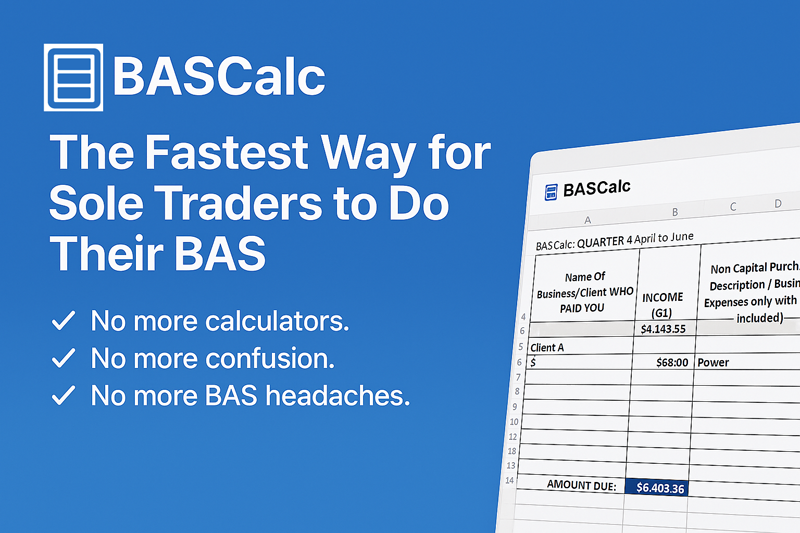
BASCalc runs in Excel, so it looks and feels familiar from day one – no new software to learn, just clearer BAS figures.

ORDER NOW

This is the actual BASCalc spreadsheet you’ll be using — it auto-calculates every field required for your MyGov ATO BAS lodgement.

Stop Overpaying for BAS Lodgements

As a sole trader in regional Western Australia, I used to pay my accountant over $600 every quarter just to prepare a simple BAS. That’s why I created BASCalc — a straightforward Excel-based system that does your GST and PAYG calculations instantly, without the stress or ongoing accounting fees.

Take control of your BAS and keep more money in your pocket.

Accounting Made Easy

1

Stop Paying for BAS Lodgements

Most sole traders don’t need an accountant for quarterly GST reporting.

2

Prepare Your BAS in Under an Hour

Clear, ready-to-copy GST and PAYG figures — no accountant required.

3

Save Money Every Quarter

Keep hundreds of dollars in your pocket instead of paying unnecessary fees.

Stop Wasting Money on Accountants!

1. What exactly is BASCalc?

BASCalc is a ready-to-use Excel template designed for Australian sole traders. Just enter your income and expenses — and the spreadsheet automatically calculates the GST you collected, GST credits, PAYG instalments, and the amount you owe on your BAS

2. Do I need to be good at spreadsheets to use it?

Not at all. BASCalc is designed for beginners — every cell you need to fill in is clearly labelled, and all the formulas are pre-built. If you can copy and paste your transactions, you can complete your BAS

3. Will this work for all sole traders?

YES
BASCalc is suitable for:
Sole traders
Freelancers
Side-hustle operators
Small service businesses
Small product-based businesses
If you collect GST or claim GST credits, this will work for you.

4. Is this ATO compliant?

Yes. BASCalc follows the exact structure of the ATO BAS form and uses the correct GST and PAYG calculation rules.You still lodge your BAS through the ATO as normal — BASCalc simply gives you the totals instantly.

5. How long does it take to complete my BAS?

Most users complete their quarterly BAS on MyGov in under 15 minutes once their income and expenses are pasted into the template. BASCalc gives you the exact totals instantly, so lodging online becomes quick and stress-free.

6. Do I need to pay a monthly subscription?

No. BASCalc is a one-time purchase — no subscriptions, no hidden fees, no ongoing costs.
Your download link and unique access code are delivered instantly after payment.

7. What software do I need?

You only need Microsoft Excel (any version from the last 10 years).
It also works perfectly on Excel for Mac.

8. Can I reuse the spreadsheet each quarter?

Yes! Once purchased, you can use BASCalc every quarter and every year — indefinitely.
Simply save a fresh copy for each BAS period.
The template also includes four dedicated quarter sheets (Q1–Q4) already built in for easy, repeat use.

9.  What if I need help using the template?

BASCalc includes a simple step-by-step Help section on the website to guide you through setup and BAS entry. While technical support for installation issues is available, BASCalc does not provide accounting advice, BAS interpretation, or personalised tax support.

10. Is there a refund policy?

Because BASCalc is a digital download, all sales are final once the file and access code have been delivered.
If you experience a technical issue and have not accessed the file, please contact us within 14 days for assistance..

11. Is this my end-of-year tax return or business accounts?

No. BASCalc is for your quarterly BAS statements — the reports that GST-registered businesses must lodge every 3 months through your MyGov Business Portal. This is where you report and pay your GST, and (if applicable) your PAYG instalments. Your end-of-year tax return and business accounts are a completely separate process handled at tax time.

12. What is GST?
  1. GST (Goods and Services Tax) is the 10% tax added to most goods and services you sell in Australia. If you’re registered for GST, you must:
  2. Collect GST from your customers.
  3. Put that money aside (it’s not yours).
  4. Report it on your BAS every 3 months.
  5. Pay the GST you collected to the ATO (minus any GST credits from your business expenses).
  6. Example:   Charge a customer $110 → $100 is yours, $10 is GST you owe the ATO.
13. What is PAYG?

PAYG (Pay As You Go instalments) is a system where the ATO gets your income tax in advance during the year — instead of waiting until tax time. If the ATO has put you on PAYG instalments, it means:
You pay a set amount of income tax each quarter.
This amount is included in your BAS (usually at label T7 or T1).
It reduces your tax bill at year-end.

Important:
PAYG is NOT GST.
It’s your personal/business income tax paid in instalments, not a fee. Example:
Your BAS might say to pay $1500 PAYG this quarter — that goes towards your income tax for the year.

14. What if I don’t know my PAYG amount?

Don’t stress — you don’t have to calculate PAYG yourself. Your PAYG instalment is automatically decided by the ATO based on last year’s tax return.

 When you log into MyGov → ATO → Lodgements → Activity Statements, your PAYG amount will already be pre-filled by the ATO. Two possibilities: 

✅ 1. You normally owe tax → PAYG will appear automatically Just copy and paste the amount from MyGov into your BASCalc spreadsheet.
That’s it.

 ✅ 2. You normally get a tax refund → you won’t have any PAYG If the ATO usually gives you a refund at tax time, your PAYG instalment will be $0, and nothing needs to be entered. No calculations.
No confusion.

 BASCalc works for both situations instantly.

From the Team Behind These Australian Digital Brands

Why I Built BASCalc

“​I’m a sole trader in regional Western Australia. For years I handed hundreds of dollars to accountants every quarter just to lodge a simple BAS. I knew there had to be a better way, so I built a spreadsheet that calculates GST instantly — no confusion, no stress, no wasted money.
Now it’s available for other small businesses who want complete control over their own BAS."

Joanne J Smith, B.A.

Founder — YaZoogle  & BASCalc

Get Your BAS, Finally Under Control

Running a small business is hard enough without battling a government form every three months. With BASCalc excel sheet, your totals are calculated instantly, your figures are crystal clear, and lodging online becomes as quick as checking your emails.
A calm, straightforward BAS — every quarter, for life.
>> ORDER NOW Only $49 + GST